Hit enter to search or ESC to close
Close Search
ConnectionPoint Help Center
Menu
  • About
  • Contact
  • Help Centre

    Help Guide

    • Getting Started
      • About the ConnectionPoint Help Center
      • ConnectionPoint Login
      • ConnectionPoint Platforms
      • Crowdfunding 101 with ConnectionPoint
      • All About Organization Profiles
    • Pricing & Payments
      • How to understand the difference between Pricing Models
      • Payment Processing Accounts & How to Collect Funds
    • Apps & Integrations
      • Zapier
      • Embedded Live Streaming
      • Raiser’s Edge
      • Facebook Pixel
      • Google Analytics
      • Mailchimp
    • Resources
      • Glossary of common ConnectionPoint terms
      • Campaign Stickers for Download – Crowdfundr
      • Fundraiser HUB by ConnectionPoint for FundRazr, CoCoPay, & PetFundr
      • Creator HUB by Crowdfundr
      • FundRazr Blog
      • CoCoPay Blog
      • Discord Channels

    Fundamentals

    • Navigating the platform
    • ConnectionPoint Platform FAQs
    • Campaign Privacy Settings
    • How to share a campaign
    • Adding payment processors
    • How to create a campaign

    Organization Management

    • Email Communication for Organizations (Creating your Community)
    • How to set up Dedications
    • How to set up Allocations
    • Organization Fundamentals
      • Organization Verification: How do I get Verified?
      • Organization Staff
      • How to create an organization campaign
      • How to create an organization profile
      • What is an organization profile? Who can start one?
    • Organization General Set-up & Management
      • Turn Your Supporters into Advocates for Your Organization
      • How to set up Dedications
      • How to set up Allocations
      • How to enable Mailchimp on your Campaign
      • How to customize your organization theme (including campaign headers, fonts, and colours)
      • Apply Gift Aid to your campaign (UK organizations only)
      • Setting up automatic tax receipts
      • How to set up Mailchimp in your organization
      • Connect Google Analytics and Facebook Pixel
      • Editing organizational information
      • Where to find and edit your organization profile
      • Customizing and embedding organization widgets
      • Archive campaigns in your organization’s campaign list.
      • Organization logo: where it appears and how to edit it
      • Sponsor match: Set up a sponsor banner with optional matching fund capabilities
      • Notify past supporters about new campaigns with one click!
      • Organization Verification: How do I get Verified?
      • All About Organization Profiles
    • Organization Teams
      • What is the difference between Campaign Team and Organization Staff?
      • How do I add, remove, and change staff member permissions?
      • Staff notifications
      • Organization Staff
    • Organization Payment Accounts & Troubleshooting
      • Transaction codes: Identifying campaign transactions in payment accounts
      • Organizations: Default pricing model
      • Organizations: How to change the payment processing account
      • Why can’t I connect my PayPal account?
      • Do I need a PayPal account to use a ConnectionPoint platform?
      • Stripe or PayPal – Which should I choose? What’s the difference?
      • Roadblock: The receiver PayPal account is set to block (Error Code: 559044)
      • Roadblock: The PayPal account is restricted
      • Roadblock: The PayPal account is locked
      • Roadblock: The PayPal account is based in a country which cannot receive payments (Error 539041)
      • Roadblock: The PayPal account has exceeded its sending limit (Error Code: 579048)
      • Roadblock: The PayPal account email address is not confirmed
      • Roadblock: The email address cannot accept payments
      • Error Code: 1001 – The payment has been cancelled
    • Organization FAQ
      • How to understand the difference between Pricing Models
      • I think I’m missing a table column…
      • Can I view a list of organizations I’m on the Staff team for?
      • Can I run more than one campaign at the same time? 
      • Will you send me a 1099-K form? (USA only)
      • What happens if users or campaigns break Terms of Service?
      • Will you share my campaign?
      • What languages can I run my campaign in?
      • What is the difference between Campaign Team and Organization Staff?

    Campaign Management

    • 🖼️ Let Your Supporters Shine! – Media Gallery Enhancements
    • ⏳ Automatically Finish Campaign at Deadline
    • ⏳ Timeline Features – How to Schedule Your Campaign
    • How to Maximize Support with Embeddable Donation Forms!
    • Campaign Fundamentals
      • How to Maximize Support with Embeddable Donation Forms!
      • How to start a new campaign
      • Campaign Layouts – similarities, differences, and how to switch them.
      • How to set and change the campaign goal
      • How to set the campaign deadline
      • Launch your campaign
      • How to share a campaign
      • Visual Editor Navigation
      • Keep-it-all or All-or-nothing campaign… What’s the difference?
    • General Campaign Help
      • How do I delete comments or contributions from the activity feed?
      • What is a ‘Rollover’ campaign?
      • What are the campaign Highlights?
      • Campaign Story Updates – How to add, edit, and delete.
      • How to customize the campaign link
      • How to delete a campaign
      • How to add a campaign background
      • How to edit the campaign title
      • The social media summary and how to change it.
      • How to change campaign types: Keep-it-all and All-or-nothing
      • Campaign Comments and Activity Feed
      • How to preview a campaign in desktop, tablet, and mobile phone views.
      • How to change a campaign category
      • Add campaign notes for future help
      • How to pause, restart, or finish a campaign
      • How to clone a campaign
      • Embed a live-stream video into your campaign
      • Launch your campaign
      • What is the campaign time limit?
      • How does the platform handle sales tax?
      • Notify past supporters about new campaigns with one click!
      • What do I do if I DO NOT reach the campaign goal?
    • Campaign Goals & Deadlines
      • ⏳ Automatically Finish Campaign at Deadline
      • KEEP-IT-ALL CAMPAIGNS: How to reset the launch date
      • ALL OR NOTHING CAMPAIGNS: What happens when an all-or-nothing campaign goal is reached?
      • ALL-OR-NOTHING CAMPAIGNS: What happens when you reach the all-or-nothing campaign deadline?
      • KEEP-IT-ALL CAMPAIGNS: What happens when the campaign hits its deadline?
      • Campaign funding limit: ensure you do NOT raise more than your goal
      • How to set and change the campaign goal
      • How to set the campaign deadline
      • How to remove the campaign stats (such as goal and deadline)
      • What is the campaign time limit?
      • What are ‘Campaign Stats’?
    • Campaign Teams
      • How to message campaign team members
      • How to set a main campaign team member goal
      • How to show or hide campaign team features
      • Contribution tracking: How to track which team members inspired which contributions
      • How to add or change a campaign team name and picture
      • How to hide team members from public view
      • Campaign Team Notifications
      • How to change a team member role
      • How to remove campaign team members
      • How to add campaign team members
      • Campaign Team Roles & Permissions
      • What is a campaign team?
    • Campaign Story
      • Adding Emojis & GIFs to Your Contributions and Campaigns
      • AI Story Assist
      • Story Editor FAQs
      • Responsive preview – Formatting your story for all devices
      • How to add external & internal campaign story links
      • How to add extra campaign story tabs
      • How to insert a campaign story video
      • How to insert and resize campaign story pictures
      • How to add campaign story anchors
      • How to change the campaign story font style, size, and colour
      • The social media summary and how to change it.
      • Campaign Story Updates – How to add, edit, and delete.
      • How to edit the campaign story
    • Campaign Media Gallery
      • 🖼️ Let Your Supporters Shine! – Media Gallery Enhancements
      • How to format pictures in the media gallery
      • How to add or delete pictures & videos from the Media Gallery
      • How to make your media gallery a slideshow
      • How to add or change the campaign cover picture & video
    • Campaign Sharing & Communication
      • 📢 How Are Campaigns Shared?
      • Campaign Link – Where to find yours
      • How to import contacts onto your campaign
      • Campaign Referral Links
      • Campaign QR Code
      • Campaign commenting – to allow or not to allow?
      • How to add a personal message to a campaign
      • How to notify past supporters with one click
      • How to embed a campaign to an outside site
      • Private Campaign Messaging
      • Campaign confirmation email
      • Text-to-give (Organizations only)
      • Campaign Sharing & Communication FAQ
    • Campaign Tasks
      • What are campaign tasks?
      • How to use campaign tasks
      • How to create tasks
    • Campaign Pricing & Payments
      • Prompt for unrestricted usage of funds
      • How to understand the difference between Pricing Models
      • Are the contributions I receive taxable?
      • Can I contribute (donate) to myself?
      • What countries can I accept payments from?
      • ALL OR NOTHING CAMPAIGNS: Failed pledges
      • What currencies do you accept?
      • How do I withdraw/receive my funds?
      • Disallowing pictures with contribution comments
      • Apply Gift Aid to your campaign (UK organizations only)
      • ALL OR NOTHING CAMPAIGNS – How to cancel a pledge
      • What is the effective fee rate? Where do I find mine?
      • Can I change the currency displayed in the stats of my campaign?
      • How to customize the ‘Contribute’ button
      • How to customize contribution amounts
      • Recurring contributions – adding and modifying
      • Text-to-give (Organizations only)
      • Find and resend tax receipts to supporters
      • A contribution has been attributed to (i.e. credit given to) the wrong team member. Can I change this?
      • Customize the payment confirmation email to campaign supporters
      • How to add offline contributions
      • How to issue a refund
      • How to view and download campaign transaction details
      • Choosing what supporter information to collect
      • Adding payment processors
      • Apply automatic tax-deductible receipts to a campaign (Organizations only)
      • How to change your campaign’s pricing model
      • Can a supporter’s contribution be completely anonymous?
    • Campaign Analytics
      • Campaign conversion rates & average gift per supporter
      • How to add Google Analytics to your campaign
      • Adding Facebook Pixel to your campaign
      • What to learn from Campaign Analytics
      • What is the effective fee rate? Where do I find mine?
    • Campaign Privacy
      • How to hide a campaign from your user profile
      • 🔒 Campaign Privacy Settings
      • How to turn campaign comments on/off
      • Campaign Privacy Settings
    • Campaign FAQ
      • What campaigns or projects are NOT allowed to use a ConnectionPoint platform?
      • Am I allowed to host a raffle or auction on any ConnectionPoint platform?
      • Can I raise money for disaster or tragedy relief?
      • What’s the difference between a personal campaign and organization campaign?
      • What happens if, after I’m finished my campaign, I need more funds to complete the project?
      • I don’t have a network. Will you share my campaign?
      • Can I remove the prompt asking for a top-up to contributions?
      • Why is someone else’s name and picture at the top of my campaign?
      • Is the campaign visible before launch?
      • What is a campaign’s ‘Category’? Why is it useful?
      • Can I message all (team members, contributors/supporters, subscribers) at once? Separately?
      • Can a campaign’s team members get credit for contributions from their friends and family?
      • My customer has a question about your platform, where do I send them?
      • Why does my campaign’s header and/or URL look different?
      • Can I raise money on behalf of a charity?
      • ALL OR NOTHING CAMPAIGNS: Failed pledges
      • Campaign Link – Where to find yours
      • What do I do if I DO NOT reach the campaign goal?
      • What is the campaign time limit?
      • How does the platform handle sales tax?
      • What pricing model is my campaign on?
      • How do you (ConnectionPoint: FundRazr, CoCoPay, Crowdfundr, Petfunder) make money off the platform?
      • What languages can I run my campaign in?
      • Will you share my campaign?
      • Can I run more than one campaign at the same time? 
      • What happens if users or campaigns break Terms of Service?
      • I think I’m missing a table column…
    • Campaign Rewards
      • ALL OR NOTHING CAMPAIGNS: Allowing supporters to cancel pledges
      • ALL OR NOTHING CAMPAIGNS: How to change a pledged reward order
      • Mark an order ‘Complete’
      • How to fill in missing addresses or edit addresses for reward fulfillment
      • How to organize orders for reward fulfillment
      • How to edit, arrange, discontinue, and delete reward items
      • How to create a reward
      • What are the differences between Reward Types? Perks, Wishes, Products, and Tickets?
      • Campaign Rewards & Shipping FAQ
      • How is shipping calculated for orders of multiple rewards?
      • How do tickets work?
    • Campaign Payment Troubleshooting
      • Roadblock: The PayPal account has exceeded its sending limit (Error Code: 579048)
      • Error Code: 1001 – The payment has been cancelled
      • Roadblock: The email address cannot accept payments
      • Roadblock: The PayPal account email address is not confirmed
      • Roadblock: The PayPal account is based in a country which cannot receive payments (Error 539041)
      • Roadblock: The PayPal account is locked
      • Roadblock: The PayPal account is restricted
      • Roadblock: The receiver PayPal account is set to block (Error Code: 559044)
      • Why can’t I connect my PayPal account?
    • Sub Campaigns
      • Increase Campaign Participation with Targeted Invitations
      • Sub-campaign Management
        • Sub-campaign transactions and financial reports
        • Creating Sub-campaign Deadlines
        • Viewing registrant (fundraiser) information
      • Sub-campaign Content
        • How to set a sub-campaign title template
        • Sub-campaign stories: setting and editing a story template
        • How to set up rewards on sub-campaigns
        • How to hide stats (goal, deadline, funds raised, & number of supporters) on sub-campaigns
        • Sub-campaign Galleries
      • Sub-Campaigns: Goals & Deadlines
        • What is the difference between a sub-campaign goal and the team member goal?
        • How to set or edit the sub-campaign goal
        • How to set or edit the sub-campaign team member goal
        • How to prevent sub-campaign owners from changing the sub-campaign goal.
        • What is the difference between a sub-campaign goal and the main campaign goal?
      • Sub-campaign Teams
        • Why are my team members listed as individuals?
        • Why are my team members listed as individuals?
        • What is the difference between a sub-campaign goal and the team member goal?
        • How to switch a user from one sub-campaign team to another.
        • How to change an individual sub-campaign into a team sub-campaign.
        • How to change a sub-campaign team name and/or picture
        • How to hide the ‘Join a team’ banner from sub-campaigns and widgets
        • How to invite team members to a sub-campaign
        • How to edit a team member personal message
        • List, leaderboard, grid, or not at all: Options for viewing sub-campaigns on other related sub-campaigns
        • What is the difference between a campaign team and a sub-campaign team?
      • Sub-campaigns: Registration
        • How to Add Content Tabs to Your Registration Page
        • What is the confirmation message, and how do I edit it?
        • What does the registration flow look like?
        • Viewing registrant (fundraiser) information
        • Automatically launch sub-campaigns
        • Mandatory approval for newly created sub-campaigns
        • Allowing team members to skip registration
        • Encourage sub-campaign customization in registration flow
        • Registration fees & rewards: how to add, edit, and troubleshoot
        • Registration waivers & compliance messages
        • Customizing the Registration Form
        • Registration for individuals, teams, or both
      • Sub-campaigns: Fundamentals & Set-Up
        • Sub-Campaigns: What is a sub-campaign? How are they used?
        • List, leaderboard, grid, or not at all: Options for viewing sub-campaigns on other related sub-campaigns
        • How to create a sub-campaign
        • Add a beneficiary to your sub-campaign
        • How to turn on the sub-campaign feature
        • How to launch, pause, finish, and delete sub-campaigns
      • Sub-campaign FAQ
        • Why are my team members listed as individuals?
        • Where is the information from my custom registration form?
        • Why is there a banner with another user’s name on my sub-campaign (or why is my picture and name on another campaign)?
        • Does every team member have to complete registration?
        • Can the sub-campaigns have different deadlines?
        • How to launch, pause, finish, and delete sub-campaigns
        • Can I hide transactions from sub-campaign owners?
        • How do I view the main campaign when I’m in a sub-campaign?
      • Sub-Campaigns: Invitations
        • Increase Campaign Participation with Targeted Invitations

    User Account Management

    • General User Account Information
      • Can I hide just one campaign on my user profile without hiding all of them?
      • All about your user profile
      • Changing user profile privacy
      • How to change or unlink your social accounts
      • How to change your account email and/or password
      • How to change your user profile picture
      • How to change your user name
      • Deleting user accounts
      • How to create a ConnectionPoint user account and get started
      • How to change email notifications from the platforms
    • Account Troubleshooting
      • Do I need a personal Facebook account to use the platform?
      • Why do I need a user picture? Where does it appear?
      • Why your campaign list or user profile may look different/be missing items
      • I forgot my password
      • Can I change my view to Dark mode?
      • Hiding and revealing the navigation menu
      • I think I’m missing a table column…

    Payment Processing

    • Payment Processing - General Information & Set-up
      • ORGANIZATIONS: Adding or changing payment processors
      • PERSONAL CAMPAIGNS: How to add a payment processor
      • Choosing what supporter information to collect
      • Customize the payment confirmation email to campaign supporters
    • Payment Processing - Error Messages & Troubleshooting
      • Roadblock: The PayPal account has exceeded its sending limit (Error Code: 579048)
      • Error Code: 1001 – The payment has been cancelled
      • Roadblock: The email address cannot accept payments
      • Roadblock: The PayPal account email address is not confirmed
      • Roadblock: The PayPal account is based in a country which cannot receive payments (Error 539041)
      • Roadblock: The PayPal account is locked
      • Roadblock: The PayPal account is restricted
      • Roadblock: The receiver PayPal account is set to block (Error Code: 559044)
      • Why can’t I connect my PayPal account?
    • Payment FAQs
      • Are the contributions I receive taxable?
      • Can I contribute (donate) to myself?
      • What countries can I accept payments from?
      • Can campaigns connect with providers other than PayPal and Stripe?
      • Can you help me get a Stripe/PayPal account or troubleshoot issues with my Stripe/PayPal account?
      • Can I give out tax receipts on the platform?
      • Do you connect with Gift Aid (United Kingdom users only)
      • Do you allow recurring contributions?
      • What currencies do you accept?
      • How do I withdraw/receive my funds?
      • Do you allow offline contributions?
      • Do I need a PayPal account to use a ConnectionPoint platform?
      • How to understand the difference between Pricing Models
    • Stripe & PayPal Information
      • How do I contact someone from PayPal?
      • How do I contact someone from Stripe?
      • Stripe or PayPal – Which should I choose? What’s the difference?

    For Supporters

    • Contributions
      • Do I need a PayPal or Stripe account to contribute to a campaign?
      • Can I view a list of every contribution I’ve made? Can I view past tax receipts?
      • How do I edit/skip/cancel my recurring contributions?
      • Editing contribution details
      • Can I contribute to a campaign outside of my country?
      • Do I need a ConnectionPoint account to contribute?
      • Why do I see two separate charges for my contribution on my statement?
      • What payment forms do you accept?
      • Roadblock: The receiver PayPal account is set to block (Error Code: 559044)
      • Roadblock: The PayPal account is restricted
      • Roadblock: The PayPal account is locked
      • Roadblock: The PayPal account is based in a country which cannot receive payments (Error 539041)
      • Roadblock: The PayPal account has exceeded its sending limit (Error Code: 579048)
      • Roadblock: The PayPal account email address is not confirmed
      • Roadblock: The email address cannot accept payments
      • Error Code: 1001 – The payment has been cancelled
      • How is a contribution made?
      • Will I receive a receipt for my contribution?
    • FAQ
      • Can I browse campaigns that are currently running?
      • How do I contact a campaign owner?
      • Can my campaign contribution be completely anonymous?
      • What does it mean to subscribe to a campaign?
      • What are campaign updates? Where can I view them?
      • What do I do if I don’t receive my contribution reward?
      • What happens if the campaign I contributed to does not meet its goal?
      • How do I know a campaign is not a scam?
      • Is my campaign contribution secure?

    Resources

    • Campaign Stickers for Download – Crowdfundr
    • Fundraiser HUB by ConnectionPoint for FundRazr, CoCoPay, & PetFundr
    • Creator HUB by Crowdfundr
    • FundRazr Blog
    • CoCoPay Blog
    • Discord Channels

    About ConnectionPoint

    • Who is ConnectionPoint? How is it connected to FundRazr/Crowdfundr/CoCoPay/PetFundr?
    • ConnectionPoint Security Description
    • ConnectionPoint Privacy Policy
    • ConnectionPoint Terms of Service

    Talk To Us

    • FAQs
      • In what languages does ConnectionPoint offer support?
      • How do I report fraud?
      • How soon can I expect an answer from a support agent?
      • I think I found a bug. How do I report it?
      • How do I contact someone from ConnectionPoint?
      • How do I report spam or abusive comments?
      • Can I suggest a feature?
      • Can I call someone?
    • Live Chat
      • Discord Channels
    View Categories
    • Home
    • Help Centre
    • Campaign Management
    • Campaign Fundamentals
    • How to Maximize Support with Embeddable Donation Forms!

    How to Maximize Support with Embeddable Donation Forms!

    Organizations only #

    Embeddable and mobile-friendly, our donation forms at ConnectionPoint are designed to make gathering one-time or recurring donations a breeze from your website. Take your impact to the next level and spark generosity by creating and implementing a donation form in just a few minutes.
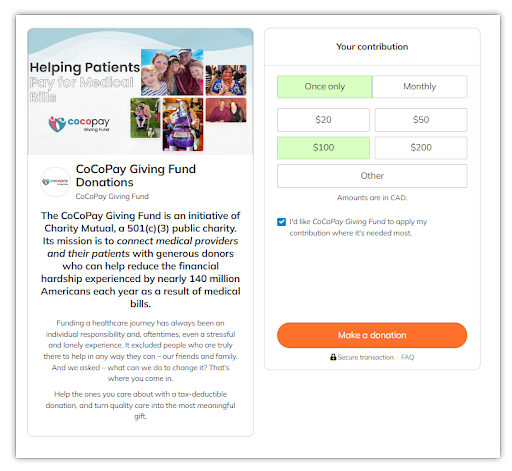
    Key Features:

    1. Add Images & Story:
    Including a cover image and a story on your donation form can make a big difference. An engaging image related to your cause grabs attention, while a short, heartfelt story about your mission and the impact of donations can inspire people to give. This personal touch helps connect donors to your cause, increasing engagement and support.
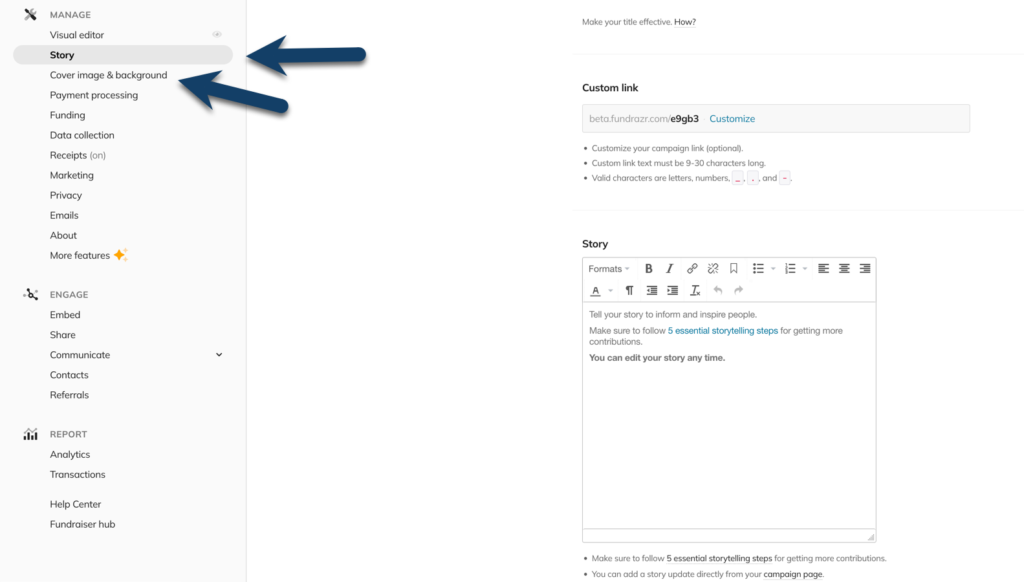
    2. Effortless Embedding:

    Embedding our donation form into your website is a breeze! There’s no need to worry about technical hurdles. Our seamless integration makes the process as easy as pie. With just a few clicks, you can have the form up and running, providing donors with a smooth and professional giving experience.

    What’s New?

    We’ve introduced a new widget type called simple-checkout — designed specifically for embedding donation campaigns in a clean, single-column layout on your website. This widget is ideal for narrow spaces, like sidebars or mobile views.

    ✅ Key Features of the Simple-Checkout Widget:

    • Optimized Layout: The simple-checkout widget is perfect for tight spaces and smaller screens, offering a sleek, compact layout.
    • Above-the-Fold Visibility: If your campaign doesn’t include a story, the gift array and “Contribute” button will appear above the fold — no scrolling needed for donors to get started.
    • Consistent Height: The widget maintains a fixed height throughout the payment flow, ensuring a smooth, uninterrupted experience as donors move from gift selection to entering payment information.

    How to Embed the Simple-Checkout Widget:

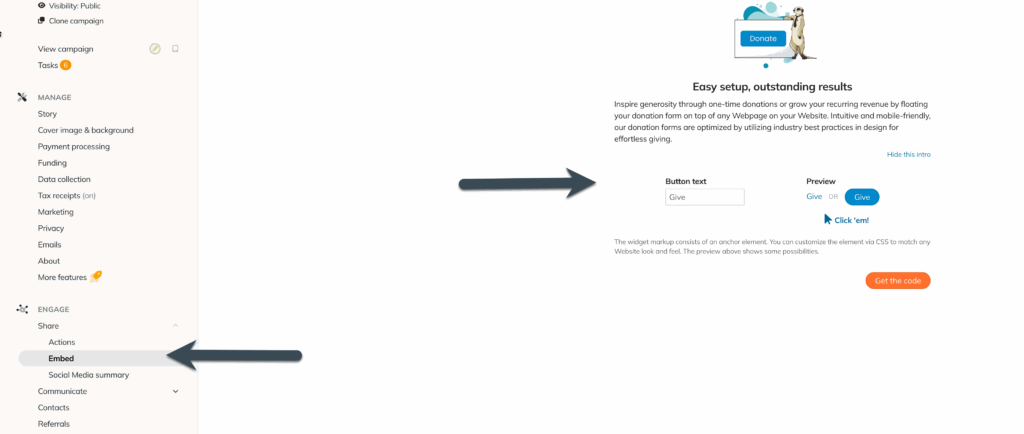
    1. Navigate to the Engage Section: In your dashboard, go to the Engage tab.
    2. Click on the Embed Tab: Here, you’ll find all the options for embedding your donation form.
    3. Choose the Simple-Checkout Widget Type: In your settings, select the simple-checkout widget for a sleek, mobile-friendly design.
    4. Get Your Embed Code: Once you’ve chosen the simple-checkout widget, click on Get the Code. You’ll receive a custom HTML code tailored to your campaign.
    5. Paste the Code: Copy the generated embed code and paste it into the HTML of your website where you want the donation form to appear (e.g., within the body section of your webpage).

    Customizing Your Donation Form

    You can easily customize the appearance and behaviour of your donation form:

    • Button Text: Adjust the text on your “Donate” button to match your campaign tone.
    • Widget Type: Choose from different widget options, including the simple-checkout for a streamlined, single-column look.

    Mobile and Desktop Compatibility

    Our donation form is fully responsive and looks great on both desktop and mobile devices. Donors will have a smooth experience no matter how they access your site.

    Troubleshooting

    If your form isn’t displaying correctly or you’re experiencing issues:

    If the form isn’t showing up on mobile devices, confirm your website’s responsive design settings are properly configured.

    Double-check the embed code placement—ensure it’s in the body section of your webpage.

    Ensure that the code is copied correctly without extra spaces or characters.
    3. Flexible Donation Options:
    Empower your donors to choose their giving adventure with recurring donations! Supporters can choose the frequency of their donations to suit their preferences and budgets—weekly, monthly, quarterly, or annually.

    4. Impact Tracking and Reporting:
    Curious about the impact of your fundraising efforts? Our donation forms track recurring contributions in real-time and provide detailed reports on donation activity. You can track your progress, monitor donor retention rates, and gain insights into the impact of recurring donations—it’s like having your personal fundraising superhero sidekick!

    5. Personalized Donor Profiles:
    We put the power in the hands of your donors. With personalized profiles, donors can effortlessly manage their giving journey. With a few clicks, they can update donation frequency, change amounts, update payment methods, or cancel recurring donations. It’s all about flexibility and transparency, ensuring donors feel empowered every step of the way.

    Ready to drive ongoing success for your cause? Leverage the power of ConnectionPoint’s embeddable donation forms to streamline your donation process, build stronger donor relationships, and positively impact the world.


    🚀 Want More Features? Upgrade to a Full Campaign Page #

    If you’re currently using a Donation Form but want access to more storytelling, media, and engagement tools — great news! Donation form managers can now upgrade to a full-fledged campaign with just a few clicks.

    By upgrading, you’ll unlock:

    • A full campaign story section to explain your cause in depth
    • Media support, including photos and videos
    • Activity feed with supporter comments
    • Rewards or perks setup
    • Social sharing tools and campaign customization

    This is perfect if you want to grow beyond a simple donation form and offer your supporters a richer experience.

    🔁 Want to upgrade? Head to your Manage > More Features and select the option to upgrade this campaign.
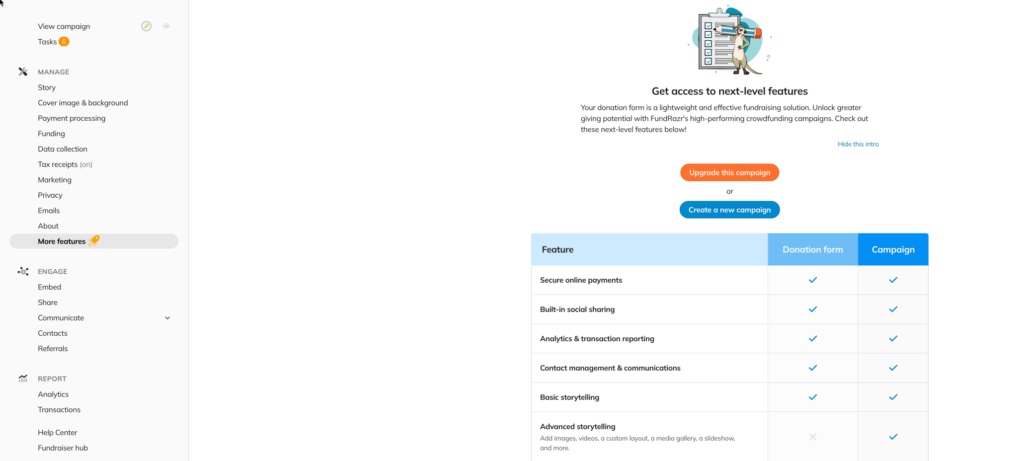
    Need help deciding? Reach out to our team — we’re happy to guide you!


    FundRazr logo, click to go to platform
    PetFundr logo, click to go to platform
    Crowdfundr logo, click to go to platform
    Cocopay logo, click to go to platform

    Share This Article :

    • Facebook
    • X
    • LinkedIn
    • Pinterest
    Need more help? Contact us now!

    How can we help?

    Updated on August 15, 2025
    How to start a new campaign⏳ Timeline Features – How to Schedule Your Campaign
    Table of Contents
    • Organizations only
      • 🚀 Want More Features? Upgrade to a Full Campaign Page

    Copyright © 2023 ConnectionPoint Systems Inc.
    Built with love in Vancouver, Canada
    All rights reserved.

    Resources

    • About
    • Contact
    • Help Centre

    Our Platforms

    • FundRazr
    • Crowdfundr
    • CoCoPay
    • PetFundr
    Close Menu
    • About
    • Contact
    • Help Centre